Jujutsu Kaisen Mugen: Download All Versions for Free (PC & Android)
Download Jujutsu Kaisen Mugen V9 (Latest Version - 2026)
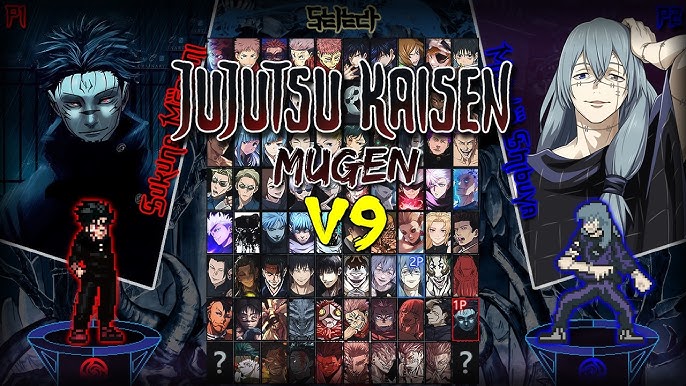
Download JJK Mugen V9 — choose OpenGL or DirectX:
| Detail | JJK Mugen V9 |
|---|---|
| 💻 Platform | PC (Windows 7+) |
| 📱 Mobile | Android via Winlator / Exagear |
| 🎮 Characters | 78 playable fighters |
| 📏 OpenGL Size | 4.73 GB (5.80 GB extracted) |
| 📏 DirectX Size | 4.62 GB (5.85 GB extracted) |
| 🕹️ Controls | Keyboard & Gamepad |
| 🏳️ Language | English |
| 🔗 Creator | Dark Night |
| 📅 Released | February 2026 |
| 🛠️ Engine | M.U.G.E.N 1.1 |
Download All Versions of Jujutsu Kaisen Mugen (V1 to V9)
Although Jujutsu Kaisen Mugen V9 is the most recent version and includes the largest roster, some players may prefer an older version. The reason is simple: older versions are significantly smaller in file size, making them a better option if you want to emulate JJK Mugen on Android using Winlator or Exagear. They are also ideal if you have limited storage space or simply do not need all 78 characters (since several are different variants of the same fighter, as you can see in the full roster below).
JJK Mugen V8
JJK Mugen V7
JJK Mugen V6
JJK Mugen V5
JJK Mugen V4
JJK Mugen V3
JJK Mugen V2
JJK Mugen V1
Tip: If you plan to play JJK Mugen on your Android phone using Winlator or Exagear, we recommend downloading V4, V5 or V6 — they offer a solid roster of characters while keeping file sizes under 2 GB, which is much easier to handle on mobile devices.
All 78 Characters in Jujutsu Kaisen Mugen V9 (Full Roster)
The latest version of JJK Mugen features 78 playable fighters inspired by the Jujutsu Kaisen anime. The roster includes heroes, villains, cursed spirits and multiple versions of key characters across different story arcs — from Shibuya to Shinjuku and the Heian Era. Below is the full character select screen and the complete fighter list:
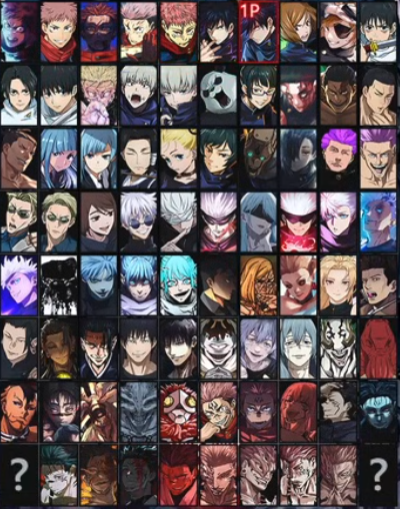
As you can see, many popular characters like Gojo, Sukuna and Itadori have multiple variants representing different story arcs and power levels. This makes Jujutsu Kaisen Mugen one of the most comprehensive JJK fan-games ever created.
How to Download and Install JJK Mugen on PC
Installing Jujutsu Kaisen Mugen on your Windows PC is straightforward. The game runs directly after extraction — no installation or crack is needed. Follow these steps:
Choose Your Version
Pick the version of JJK Mugen you want to download. We recommend V9 for the most complete experience (78 characters), or V5/V6 if you prefer a lighter download. Also choose between OpenGL and DirectX — if unsure, go with DirectX as it works on most systems.Download from Mediafire
Click the download button for your chosen version. The file will be downloaded from Mediafire as a .rar or .7z archive. Wait for the download to complete before proceeding.Extract the Game Files
Use WinRAR or 7-Zip to extract the downloaded archive to your preferred location. Make sure you have enough free storage space — V9 requires around 5.85 GB once extracted.Launch and Play
Navigate to the extracted folder and run the M.U.G.E.N executable (.exe file). The game will start immediately. Select your favorite Jujutsu Kaisen character and enjoy the battle!How to Play Jujutsu Kaisen Mugen on Android (Winlator & Exagear)
There is no native Android APK for Jujutsu Kaisen Mugen. However, you can play any version of JJK Mugen on your Android phone by using a Windows emulator. The two most popular options are Winlator and Exagear. Both allow you to run the PC version of the game directly on your mobile device.
Option 1: Play JJK Mugen on Android with Winlator (Recommended)
Winlator is a free, open-source Windows emulator for Android that allows you to run .exe files on your phone. It is the most modern and actively maintained option, offering better compatibility with newer M.U.G.E.N games like Jujutsu Kaisen Mugen.
Download Winlator
Get the latest version of Winlator from its official GitHub page (search for "Winlator GitHub releases"). It is completely free. Your phone needs Android 9+ and at least 4 GB RAM for smooth performance.Download a Lighter JJK Mugen Version
For Android mobile, we recommend downloading JJK Mugen V4, V5 or V6 instead of V9. These versions weigh under 2 GB and are much easier to run on mobile hardware. Use the DirectX version for better Winlator compatibility.Extract and Set Up a Container
Extract the .rar or .7z file on your phone using ZArchiver (free app). Then open Winlator, create a new container and point it to the folder where you extracted the game. Set the graphics to DirectX in Winlator settings.Launch JJK Mugen
Inside the Winlator container, navigate to the game folder and run the .exe file. Configure the on-screen touch controls and start playing Jujutsu Kaisen Mugen on your Android device. For the best experience, use a Bluetooth gamepad.Option 2: Play JJK Mugen on Android with Exagear
Exagear is an older Windows emulator for Android that is still popular in the M.U.G.E.N community. While it is no longer officially maintained, many modded versions are available online. Exagear tends to work better on older or lower-end Android devices since it is less resource-intensive than Winlator.
Get Exagear
Search for "Exagear Windows Emulator APK" and download it from a trusted source. Install the APK on your Android device and grant the necessary permissions. You may also need to install an OBB data file depending on the version.Transfer the Game
Download one of the lighter versions of JJK Mugen (V3, V4 or V5 recommended for Exagear) and extract it on your phone. Move the extracted folder to a location that Exagear can access.Run Through Exagear
Open Exagear, navigate to the Jujutsu Kaisen Mugen game folder and launch the .exe file. The emulator will run the Windows executable on your Android device. Configure touch controls and enjoy the game.Performance tip: Devices with Snapdragon 8-series processors (or equivalent) and at least 6 GB RAM deliver the best experience when running Mugen games through Winlator or Exagear. If your phone struggles, try lowering the resolution in the emulator settings or using an even lighter JJK Mugen version.
JJK Mugen: Enhanced Game Features
Cursed Technique Combat
Every fighter in Jujutsu Kaisen Mugen comes with unique cursed techniques and domain expansion moves faithful to the anime. Experience the full power of Gojo's Infinity, Sukuna's Malevolent Shrine and dozens more.Anime-Accurate Sprites
The game features custom-made sprites and animations that closely replicate the JJK anime visual style. Each character has been carefully designed by Dark Night and the MUGEN community.Multiple Game Modes
Enjoy Arcade Mode, VS Mode, Training Mode and local multiplayer. Both keyboard and gamepad are fully supported. Challenge your friends in 1v1 JJK battles.Jujutsu Kaisen Mugen V9 Gameplay
Frequently Asked Questions
Is Jujutsu Kaisen Mugen free to download?
Yes, all versions of JJK Mugen (V1 through V9) are completely free to download and play. This is a fan-made M.U.G.E.N project created by Dark Night and distributed for free within the MUGEN community.
What is the difference between OpenGL and DirectX versions?
OpenGL and DirectX are two different graphics rendering methods. Both versions of Jujutsu Kaisen Mugen contain the same characters and content. If you are unsure which one to pick, go with DirectX — it works on most Windows PCs. If you experience graphical glitches, try the OpenGL version instead.
Can I play JJK Mugen on my Android phone?
Yes! Although there is no native Android APK, you can use Winlator (recommended) or Exagear to emulate the Windows version on your Android mobile. We recommend downloading a lighter version like V4, V5 or V6 for the best mobile experience. Check the full step-by-step guides above.
How many characters does JJK Mugen V9 have?
Jujutsu Kaisen Mugen V9 features 78 playable characters, including multiple versions of popular fighters like Gojo (6 versions), Sukuna (11 versions), Itadori (5 versions), and Yuta (3 versions). The roster covers all major story arcs from Shibuya to Shinjuku.
Which version should I download for Android mobile?
For Android emulation through Winlator or Exagear, we recommend JJK Mugen V4, V5 or V6. These versions weigh under 2 GB extracted, which makes them much easier to run on mobile hardware. The latest V9 (5.85 GB) may struggle on phones with less than 8 GB RAM.
What are the keyboard controls for Jujutsu Kaisen Mugen?
Keyboard: Arrow Keys for movement — A/S/D for Light/Medium/Heavy Attack — Q/W/E for Special Moves — Space to Jump.
Controller: D-Pad/Stick for movement — X/Y/B for Attack Buttons — LB/RB for Special Moves — A to Jump.
You can customize all controls in the M.U.G.E.N options menu before starting a match.
Is Winlator or Exagear better for playing JJK Mugen on Android?
Winlator is the recommended option for modern phones — it is actively maintained, free, open-source, and offers better compatibility with newer MUGEN games. Exagear is a good alternative for older or lower-end devices since it uses fewer resources, but it is no longer officially updated.
Will there be a Jujutsu Kaisen Mugen V10?
The game is created and maintained by Dark Night, who has been consistently releasing new versions. Since V9 was released in February 2026, it is likely that V10 will arrive later in 2026. When it does, we will update this page with the new download links.
Explore More Mugen Game Categories
If you enjoy Jujutsu Kaisen Mugen, explore our full collection of Mugen fighting games across all categories: